01 / TARGET SELECTION
Look for profit and time to escape
Compare the base’s economy with the cost of defeating its ships and defenses. A large debris field can be attractive, but it also means more recycling capacity and more fleet exposed to a response.
- Economy
- Is the expected pillage worth the losses and effort?
- Defenses
- What must be removed to take the base, and with which ships?
- Defending fleet
- How much fleet and recycling capacity will the fight require?
- Enemy response
- Where is the enemy’s main concentration of ships—the “blob”—and where are its nearby reinforcements?
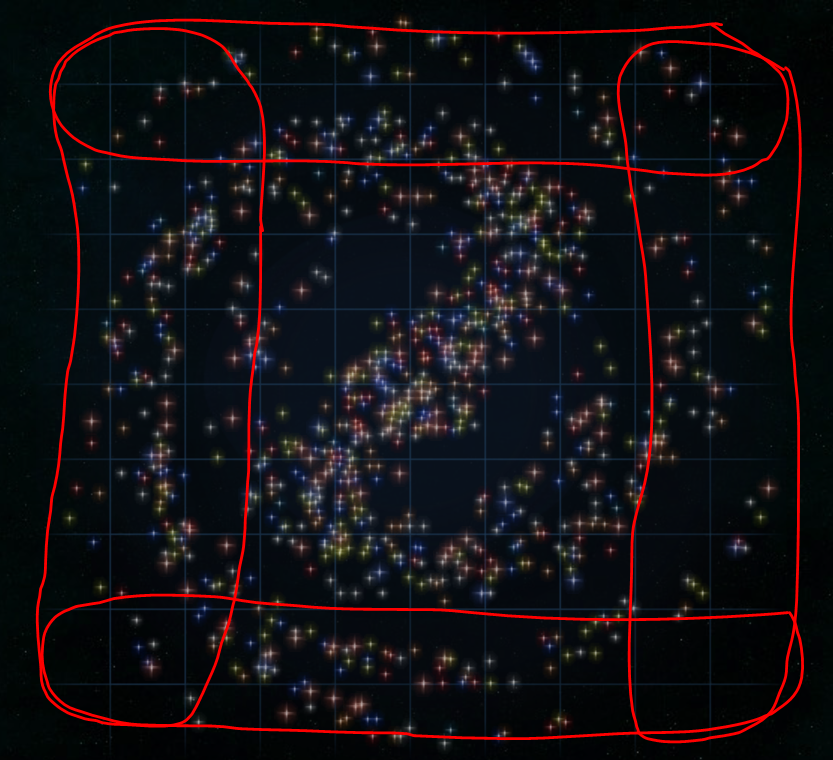
The original guide starts its search around galaxy edges. Treat that as a search habit, then check galaxy fleet reports and actual response routes. An edge location alone does not make a target safe.
See the original galaxy search illustration
02 / SCOUTING
Record the target and refresh it before arrival
Use a Scout Ship (SS) in the target region to capture a complete defending fleet list. Record the observation time along with the ships, defenses, base economy, trade-route information, Command Centers, commanders, player level and number of bases.
Save the intel and simulation link in your notes. The tutorial recommends moving the initial scout away after recording the target, then sending a fresh scout ahead of the operation to check for changes.
Use one clear scout schedule: the final scout arrives five minutes before the main fleet reaches staging, at a separate astro in the target region. That gives you time to compare the live situation with the saved simulation.
If defenders, defenses or response fleets have changed, rerun the simulation and make a fresh go/no-go decision. Old intel is a starting point for planning.
03 / SIMULATION
Find the smallest profitable attack
- Select the correct game version in AEBits. Enter the defender’s fleet, defenses, Command Centers, commanders and level.
- Enter your actual fleet, technologies, relevant Command Centers, commanders and level. Use conservative estimates for unknown enemy technology and compare more than one plausible case.
- Enter the base economy, income, defender base count and time since the last pillage where the calculator requests them. Check the current field help when translating trade-route information into income.
- Compare compositions you can actually field. Review attacker losses, expected debris, pillage and net profit. Include every planned wave or drop.
- Save the composition, simulation link, intel time, required recyclers and escape route before launch.
Income clarification: the original tutorial says to multiply trade-route value by two. That shortcut is not applied here automatically: AEBits asks for economy and income separately, so use the meaning of those fields for your game version.
Ship and defense starting points from the tutorial
The original ship cycle is missiles → plasma → ion → capital ships → missiles, where an arrow means “suggested against.” It is a rough selection aid. Validate the actual mix, technology and shielding in the simulator.
| Defender structure | Suggested units to simulate |
|---|---|
| Barracks / Laser Turrets | Battleships or larger; Fighters; Bombers |
| Missile Turrets | Titans or larger; Fighters; Bombers |
| Plasma Turrets | Leviathans or larger; Fighters; Bombers |
| Ion Turrets | Leviathans or larger; Bombers; Heavy Bombers |
| Photon Turrets | Heavy Bombers; Ion Bombers; Cruisers |
| Disruptor Turrets | Heavy Bombers; Cruisers; Heavy Cruisers |
| Deflection Shields | Cruisers or larger; Ion Bombers; Ion Frigates |
| Planetary Shields / Planetary Rings | Heavy Cruisers or larger; Ion Bombers; Ion Frigates; Cruisers |
Fleet splits: budget campaign slots before departure. The game’s split-fleet option reduces detection time by using more slots; check the proposed split in the detection calculator. Splitting does not guarantee an unnoticed arrival. Official split-fleet explanation ↗
04 / TIMING
Work backward from the recycling tick
The attack finishes before the tick. Recycling happens at the tick. The official FAQ lists collection at xx:30 each hour, at 10 credits per Recycler. Enter the corresponding time in your timezone and check it against your server clock. Official Recycler FAQ ↗
This planning example uses a scout five minutes ahead of staging and a one-minute buffer before collection. Staging five minutes before the tick leaves four minutes for the final moves and attacks; staging seven minutes before leaves six. Check every actual flight duration before relying on either window.
- T − 10 min
Scout arrives first
Check the target from a separate astro in its region. Compare the fresh intel and rerun the simulation if anything has changed.
- T − 5 min
Main fleet and recyclers reach staging
Land at the planned nearby astro. Verify the final hop durations and confirm you can still meet the recycling deadline.
- Before T − 1 min
Attack complete and recyclers in place
Send the combat group to the target, execute the simulated sequence, and have the required recyclers stationary at the debris astro. Keep carriers and noncombat ships on their planned route. The one-minute buffer is a planning choice.
- T · collection
Recyclers collect
For 21,000 credits of debris, 2,100 Recyclers provide one tick of capacity at 10 credits each.
- After collection
Confirm recovery and leave
Check the result and execute the prepared escape route for the combat fleet, carriers and recyclers.
Choose launch times separately for the scout, combat fleet and recyclers using the Lysander fleet launcher or AEBits distance calculator. The timeline above shows desired arrivals; it does not calculate travel times or send fleets.
Advanced option: multiple waves or a hangar-unit drop
Simulate the complete sequence, including the separation and movement of carriers, before departure. Count every extra move and attack against the final window. If the sequence does not fit comfortably, choose an earlier staging arrival or a simpler target and recalculate the exposure.
05 / EVACUATION
Prepare a route for every ship group
Write down the combat fleet’s destination, the carrier route and the recyclers’ route before launching. Confirm access to any friendly gate and check that the route works for the ships actually making that leg.
The tutorial suggests a neighboring galaxy as a possible recycler exit. Treat it as a route to verify in the game’s movement screen: check range, the departure gate and the destination, rather than assuming recyclers can follow any warp fleet.
Choose an operating time when you can stay at the controls throughout the arrival, attack, collection and departure. Base assumptions about enemy activity on observations rather than nationality or timezone alone.
BEFORE YOU LAUNCH
Make the plan easy to execute
Use this checklist for the current operation. Check each part of the plan before launching.
0 of 8 checked
View raid brief template
Sources and clarifications
Adapted from Ninja tutoriel. The original strategy is organized into target selection, scouting, simulation, timing and evacuation. Its ship matchups remain starting points for simulation.
The conflicting scout references are resolved here as a planning assumption: the final scout lands five minutes before staging. Five- and seven-minute staging windows come from the tutorial; the one-minute buffer is added to make the example explicit. Recycling is placed at the tick, following the official FAQ.
- Astro Empires Recycler FAQ — collection timing and capacity.
- Astro Empires split-fleet explanation — detection and campaign slots.
- AEBits battle calculator, detection calculator and distance calculator — verify the actual battle and movement plan.
Reviewed October 20, 2026. Public guide · no sign-in required.